247videogame
 Demo of Nvidia DLSS 5

Is this the future of gaming graphics?
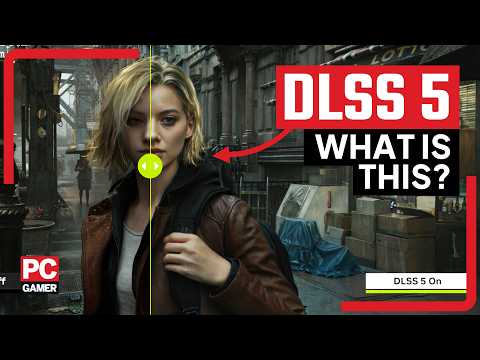
Nvidia announced DLSS 5 at GTC yesterday, and it promises to be the graphics jump that gamers have been waiting for. During a hands-on demo of The Elder Scrolls IV: Oblivion Remastered, the classic potato faces vanished, replaced by fully fleshed-out characters with photorealistic hair and skin. Using a new neural rendering model, DLSS 5 injects startlingly lifelike shadows, textures, and definition into game environments.
Demo of Nvidia DLSS 5
Introduction Nvidia’s DLSS (Deep Learning Super Sampling) has evolved rapidly, moving from the first generation’s clever upscaling to a more sophisticated, quality-driven approach in recent releases. DLSS 5 represents a notable milestone, focusing on even higher performance without compromising image fidelity. This post provides a practical, engineer-minded demonstration of DLSS 5 in action, outlining its architecture, typical workloads, and measurable impact on frame rates and visual quality.
What DLSS 5 Is and How It Fits In DLSS 5 builds on the core idea of leveraging AI-based upscaling to render fewer pixels, then reconstruct a high-resolution image that matches or exceeds native quality. Key differences in DLSS 5 include: – Enhanced temporal stability: Improved frame-to-frame consistency reduces flicker and ghosting during rapid camera movement. – Advanced motion vectors: More accurate motion estimation leads to better artifact suppression in fast-action scenes. – Refined network and upscaling pipeline: A lighter, more capable neural network enables lower latency and higher throughput on supported GPUs.
Demo Setup: What You Need to See DLSS 5 in Action To observe DLSS 5 in a controlled demo, you’ll want: – A compatible Nvidia GPU with DLSS 5 support and up-to-date drivers. – A title or benchmark build that exposes DLSS 5 as a selectable mode (Quality, Balanced, Performance, and a possible Ultra Performance tier). – A consistent test scene with varying camera motion, lighting, and post-processing effects.
Steps for a Reproducible Demo 1. Establish a baseline: Run the scene at native resolution with the highest quality settings; record frame time, average FPS, and a few representative frames for visual comparison. 2. Enable DLSS 5 in the preferred mode: Switch to Performance or Balanced mode to maximize the perceived gains, noting any changes in latency and power draw. 3. Compare image quality: Capture identical frames from native and DLSS 5 runs. Pay attention to detail in textures, edges, transparency, and motion artifacts in moving objects. 4. Analyze temporal behavior: Slow down or slow-motion segments reveal how well DLSS 5 handles motion consistency over multiple frames. 5. Quantify performance: Track average FPS, frame time variance, and GPU utilization. If available, review metrics like Neural Network Inference Throughput (TOPS-equivalent) to understand the computational budget.
What the Demo Shows, In Practice – Performance uplift: DLSS 5 typically delivers a meaningful increase in frame rate compared to native rendering, especially at higher resolutions where rasterization costs are substantial. – Visual fidelity: The upscaled result closely mirrors native visuals in still scenes, with improvements in anti-aliasing and edge clarity. In complex textures or fine details, DLSS 5 aims to preserve sharpness without introducing oversharpening artifacts. – Temporal stability: In scenes with camera pans or rapid motion, DLSS 5 demonstrates reduced shimmering and ghosting, contributing to a steadier image sequence. – Latency considerations: While higher performance modes often reduce input-to-frame latency, some settings may introduce slight differences due to the upscaling pipeline. The best choice depends on the game or application and player preference.
Best Practices for Evaluating DLSS 5 – Use multiple scenes: Test a variety of environments—indoor, outdoor, fast action, and slow panning—to understand how DLSS 5 handles diverse workloads. – Benchmark with reproducible settings: Keep resolution, FOV, and post-processing settings constant across native and DLSS runs. – Watch for edge cases: Transparent or reflective surfaces, menus, UI overlays, and smoke/fog can reveal how the upscaling interacts with compositing pipelines. – Consider platform differences: Wind-down effects, driver optimizations, and game-specific DLSS tuning can influence results across titles.
What to Expect for Developers and Content Creators – Lower render budgets: DLSS 5 allows studios to allocate fewer pixels per frame in exchange for stable, high-quality upscaling, freeing headroom for effects like more dynamic lighting or higher-resolution textures. – Faster iteration cycles: With clear performance gains, developers can test more scenarios within the same time frame, accelerating optimization cycles. – User choice and accessibility: Providing DLSS 5 as a selectable option empowers players with the balance between performance and fidelity that best matches their hardware and preferences.
Conclusion DLSS 5 represents a maturity point in Nvidia’s AI-assisted rendering stack, offering tangible performance advantages without sacrificing image quality in many scenarios. A well-constructed demo helps practitioners quantify gains, understand limitations, and communicate expectations to players and stakeholders. As the ecosystem evolves, DLSS 5 will likely become a standard consideration in performance budgets, professional pipelines, and next-generation titles alike.
24/7 Video Game
All the best video games, all the time. Watch no commentary gaming videos live and on demand. By Adrian M ThePRO the Game Professional.
Join The Pro Gamers Community
• You are a pro gamer! • Share your content! • Get discovered!
Join The Pro Gamers Community on social media or login to 24/7 Video Game and submit your posts right to this website.
Up Game Shop
New & used video games, consoles, handhelds, retro, and gaming merchandise. Up Game Shop has the latest and greatest video game deals on the internet.

Discover more from 24/7 Video Game
Subscribe to get the latest posts sent to your email.